Rolling Budget Close
Replace closed months with actuals, review the variance, and approve a controlled latest estimate.
Summary
Use Finances → Budgets → Grid → Rolling budget close to create a new version from an approved budget. Closed months use actuals. You choose how the remaining months change. The original plan stays available for comparison.
Capabilities
- Preview monthly before-and-after values and an exact reconciliation before creating a version.
- Keep remaining budget values, spread variance equally, rebase proportionally, refresh formula-backed periods from the realized run rate, or enter a manual estimate.
- Send the new version for approval and protect its values while approval is pending or complete.
- Request an approved reopen, correct values, and submit the updated version for fresh approval.
Prerequisites
Your organization must have rolling budget close and budget readiness enabled. An administrator must configure an enabled approval policy. Creating versions and requesting or applying a reopen require approval-management permission. Creating a version or sending corrections for approval also requires access to the entire budget's protected dimensions.
Select a named, approved, active budget with values in the selected year, currency, category, and dimension slice. Run readiness checks after the last source-budget change. Resolve any findings that block actualization or forecasting.
Concepts
| Term | Meaning |
|---|---|
| Actuals closed through | Last month replaced with recorded actuals. Only completed UTC calendar months can be closed. |
| Governed version | A copied budget whose values are frozen while its approval is pending or approved. |
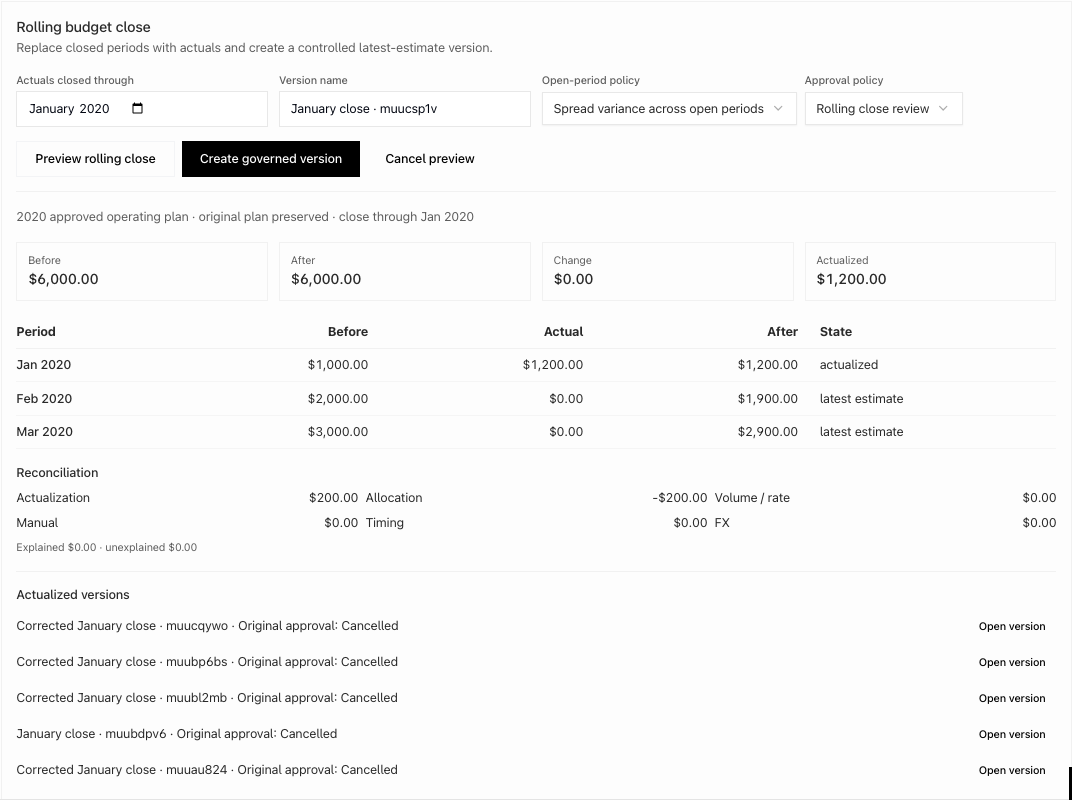
| Reconciliation | Explanation of the total change, including actualization, allocation, manual changes, and driver refresh. |
| Period close | A lock for one version, month, currency, budget kind, category scope, and dimension slice. |
| Reopen | An approved correction step that retains the close evidence and invalidates the version's prior approval. |
Workflow
- Open Finances → Budgets, select the approved scenario and year, and switch to Grid.
- Run readiness checks. In Rolling budget close, choose the last closed month, version name, open-period policy, and approval policy.
- Select Preview rolling close. Review the monthly values and reconciliation. For manual estimates, enter open-period values and preview again.
- Select Create governed version. Eigenn opens the new version and submits its approval request. Refreshing the page retains its values and close status.
- After approval, use the version for the next rolling close or a budget-to-forecast handoff.
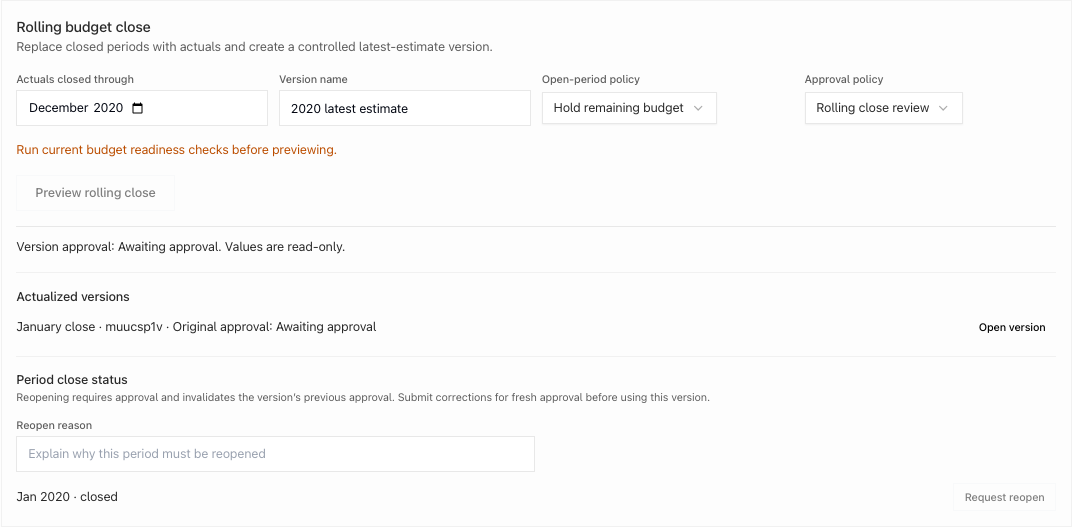
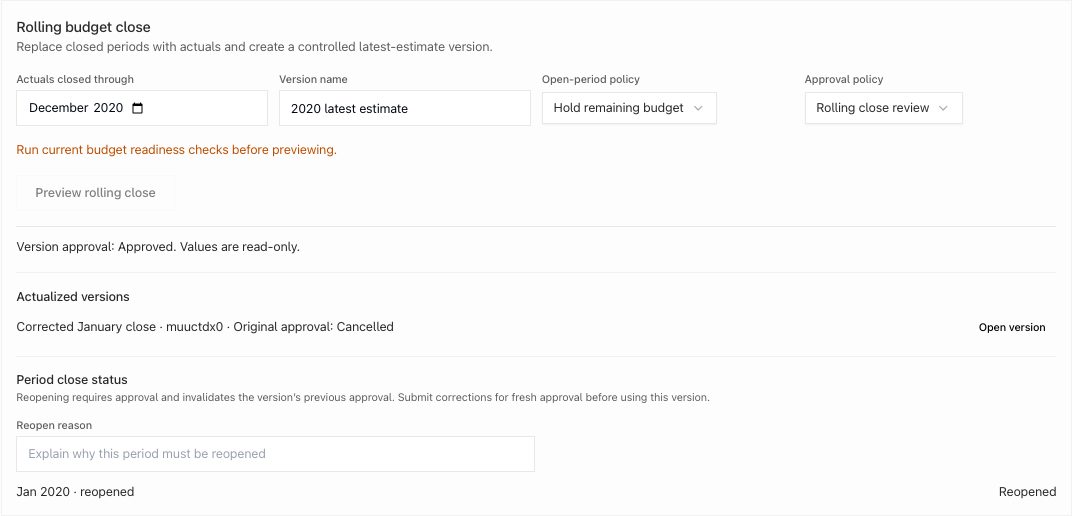
- To correct a closed month, enter a Reopen reason, select Request reopen, and obtain approval from another eligible reviewer. Select Reopen period after approval.
- Make corrections, then select Send updated version for approval. Values freeze again while the new request is reviewed.
Behavior specification
| Situation | Result |
|---|---|
| Hold remaining budget | Closed months change to actuals; open months keep their values and formulas. |
| Spread or proportional rebase | Closed-month variance is allocated to open months in the same category and dimension line. A negative remaining value blocks the preview. |
| Refresh formula drivers | Formula-backed open months use the average realized amount from closed months. Changed cells become fixed values; the original formulas remain in the source plan. |
| Manual estimate | At least one explicit open-month value is required to create the version. |
| Empty month before the cutoff | The period is closed even when it has no budget rows. |
| Zero actual | The zero-valued cell remains present in the actualized version. |
| Renamed governed version | The panel identifies the changed version and offers fresh approval. A new request supersedes earlier active version approvals; values remain locked. |
| Source changes after preview | Creation stops. Preview again before retrying. |
| Unmapped actuals or unexplained difference | Creation is blocked until the reconciliation is complete. |
| Repeated creation or reapproval request | The same request returns the existing version or approval. Reapproval retries do not duplicate reviewer notifications. |
| Requester tries to approve their own request | The approval is rejected; another eligible reviewer must decide. |
| Pending or approved version | Normal edits, imports, seeding, formulas, and bulk writes cannot change its values. |
| Approved reopen | The selected close becomes reopened. Other closed months remain locked. The prior version approval is invalidated. |
| Corrected version | Fresh approval is required before downstream use. |
| Budget alerts | Closed categories are excluded from monthly alerts, including All categories. Open-category alerts and year-end projections remain available. |
Diagrams
Rendering diagram…
Screenshots
Verification
Capture coverage uses an isolated local organization and synthetic travel activity. The acceptance flow checks keyboard preview, mobile layout, persisted values after reload, formula removal for adjusted cells, blocked writes, approval-gated reopening, corrections, and fresh approval. Verification evidence is recorded with the application commit after the flow passes.