Planning Uncertainty
Add probability formulas, run model simulations, and interpret P10, P50, and P90 outcomes without confusing ranges with guarantees.
Summary
Planning uncertainty lets a model describe a range of plausible values instead of one fixed assumption. Eigenn evaluates the ordinary model with stable central values, then samples the probability formulas during an on-demand simulation.
Use uncertainty when the range itself matters to the decision. Use ordinary scenarios when the team wants to compare a small number of named cases.
Capabilities
You can add probability distributions to model formulas to reflect uncertain assumptions. Eigenn runs multiple simulations, producing P10, P50, and P90 values for selected outputs. It supports a wide range of distributions, and maintains the consistency of shared model drivers across simulation runs.
Prerequisites
Scenario planning requires Scale or Enterprise. Use a workspace Owner account for full-model workflows; other teammates open only saved views shared with them. Changes also require active billing access. See Planning access.
You should have a planning model set up in Eigenn, with variables ready for uncertainty analysis. These variables must include probability or range-based formulas. Access to the Formula uncertainty tool and an understanding of scenario and simulation concepts are required.
Concepts
Scenarios and Uncertainty
| Method | Best for |
|---|---|
| Scenario | A coherent named case such as Hiring delayed to Q2. |
| Uncertainty | A range of plausible outcomes across repeated model runs. |
| Sensitivity check | Testing how one driver changes one output. |
These methods can be used together. Compare the deterministic base and scenario first, then run uncertainty for the output that needs a range.
Probability Formulas
Probability functions behave in two ways:
- In the ordinary grid, they return a stable central value.
- During simulation, they draw a value for each run.
Common functions include:
| Function | Use it when | Example |
|---|---|---|
uniform(from, to) | Every value in a bounded interval is equally plausible. | uniform(80, 120) |
triangle(from, to) | The middle of the interval is more plausible than the edges. | triangle(80, 120) |
normal(mean, variance) | Values cluster around a mean with symmetric variation. | normal(100, 25) |
normal_from_interval(from, to, confidence) | You know an interval and confidence level instead of a variance. | normal_from_interval(80, 120, 90) |
lognormal(mu, variance) | Values are positive and can have a long upper tail. | lognormal(0, 1) |
sample(values) | The result should be one of several discrete possibilities. | sample(80, 100, 120) |
poisson(lambda) | The input is a non-negative event count. | poisson(4) |
binomial(n, p) | The input counts successes across repeated yes-or-no trials. | binomial(10, 0.3) |
The formula editor also supports beta, cauchy, chi-squared, exponential, gamma, inverse-gamma, Pareto, and interval-based log-normal functions.
Use the formula suggestions to confirm parameter definitions. For example, the second parameter of normal is variance, not standard deviation.
Choose an Appropriate Distribution
Start with the business meaning of the assumption.
- Use a bounded distribution when the value cannot reasonably move outside a known range.
- Use a count distribution for arrivals, incidents, or conversions counted as events.
- Use a positive skewed distribution for values that cannot be negative and can occasionally be much larger than usual.
- Use
samplewhen the outcome must be one of a small number of discrete values.
Do not choose a complex distribution only because it is available. A range that the owner can explain is more useful than a precise-looking function that no one can defend.
Interpret Percentiles
- P10 is the value below which about 10% of simulated outcomes fall.
- P50 is the median simulated outcome.
- P90 is the value below which about 90% of simulated outcomes fall.
For an output where higher is better, P10 can describe a lower modeled outcome and P90 a higher modeled outcome. For a cost or cash-burn measure, the business interpretation can be reversed.
Always state:
- the output variable
- the period
- the active scenario
- the distributions used
- the model version or review date
Percentiles describe the model and its assumptions. They are not guarantees, confidence promises, or predictions independent of the model.
Workflow
Run the Simulation
Open Model settings, select Scenarios, and find Formula uncertainty.
- Select Run simulation.
- Wait for the calculation to finish.
- Select the output variable.
- Select the review period.
- Read P10, P50, and P90.
Eigenn runs the active model 200 times. Each run keeps shared drivers correlated across formulas, so one sampled driver is used consistently wherever that driver appears during the run.
The first forecast period is selected by default.
Review the Result
After a simulation:
- Compare P50 with the ordinary grid value.
- Check whether the P10-to-P90 range is decision-relevant.
- Identify the assumptions creating most of the spread.
- Confirm units and signs.
- Compare the result with a named downside scenario.
- Record the assumptions in comments or review notes.
A very wide range can be useful. It can also indicate an assumption that is too vague to support a decision.
Behavior specification
Limits
- The simulation reports only variables affected by supported range or probability formulas.
- Fixed formulas do not create uncertainty bands by themselves.
- The result reflects 200 runs with a stable simulation configuration.
- Changing the model, active scenario, source data, or period can change the result.
- Simulation does not validate source quality or formula logic.
Troubleshoot
No variables appear after the simulation
Add a supported probability formula to an input that feeds the model, then run the simulation again.
The range is unexpectedly narrow
Check whether the uncertain assumption feeds the selected output and whether the distribution parameters express the intended spread.
The range is unexpectedly wide
Check units, variance parameters, long-tailed distributions, and whether several uncertain drivers compound one another.
P50 differs from the fixed case
Some distributions use a median or other stable central value in the ordinary grid. Review the selected distribution and downstream non-linear formulas.
The simulation fails
Confirm the probability formula parameters are valid, correct upstream formula errors, and retry after the model is up to date.
Diagrams
Rendering diagram…
Screenshots
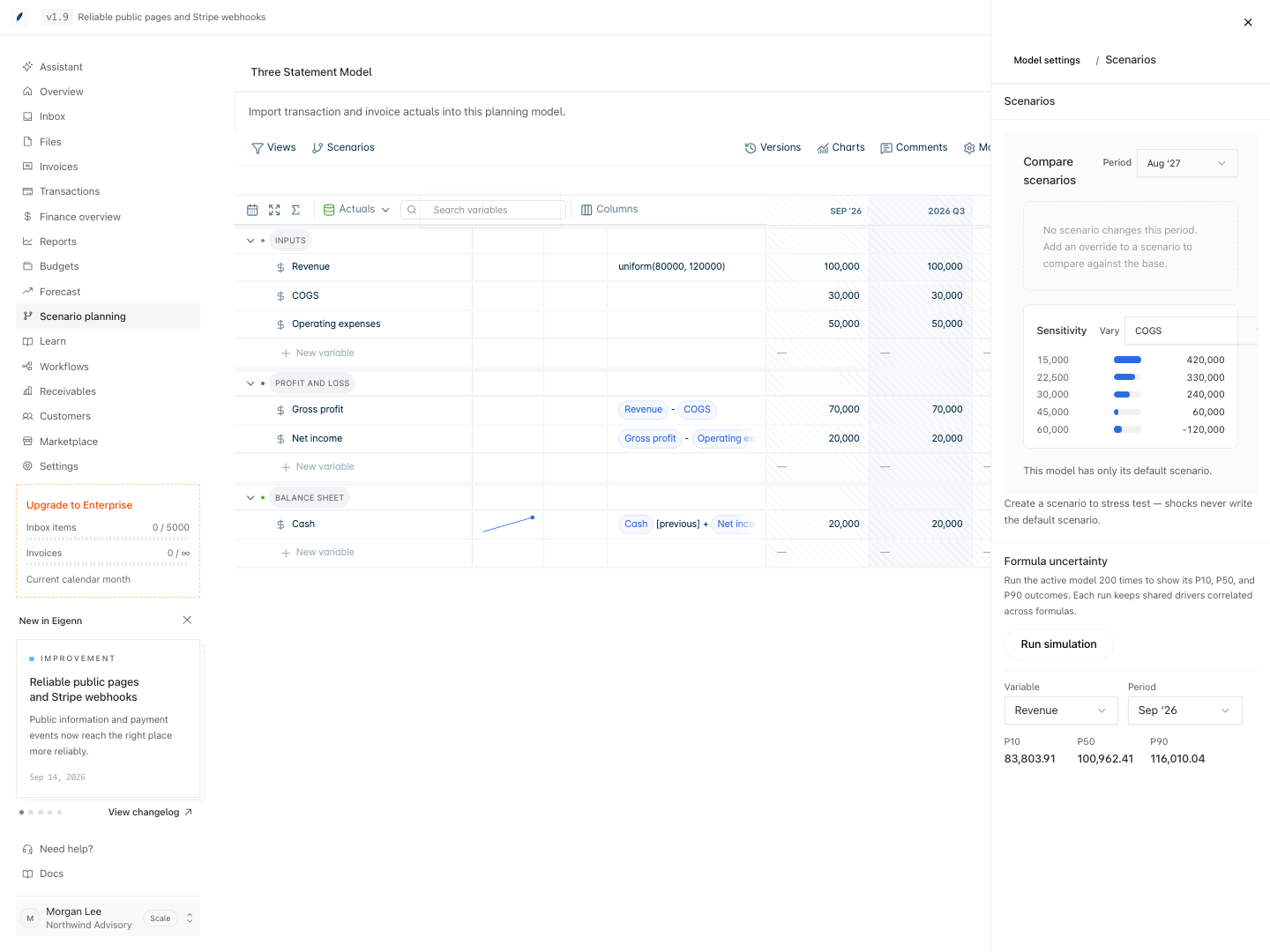
The example uses uniform(80000, 120000) for Revenue. Select a variable and period to review its simulated outcomes.
Verification
- Edit a planning model so that at least one input uses a supported probability or range formula; the field should change from a single value to one reflecting uncertainty.
- Open the Formula uncertainty panel and run a simulation; the tool should allow you to select an output variable and review period.
- On completion, observe that P10, P50, and P90 values appear for the chosen output.
- Confirm that the reported range changes if you adjust distribution parameters and rerun the simulation.
- Check that only variables using probability or range formulas display simulation results, and that fixed-value formulas do not.
- When no probability formula is present, verify that no variables are shown in the simulation output.
- Change a model input not affecting the selected output; confirm the simulation result does not materially change unless the change feeds the output.
- Record the output, scenario, period, used distributions, and model version to ensure clarity and reproducibility.
Related
Related Pages
Planning Time and Actuals
Configure model periods, fiscal and relative date displays, the actuals boundary, source refreshes, and forecast roll-forward.
Planning Versions and Collaboration
Save and restore model history, attach comments to rows, propose scenario changes, and control who can review or edit planning work.