Developer Platform
Manage scoped API access, OAuth applications, generated SDKs, OpenAPI, and remote MCP from one public contract.
Summary
Eigenn's developer platform supports server-to-server REST integrations, OAuth applications, generated SDKs, and remote MCP clients. Settings → Developer manages credentials and applications. The public API reference defines what those credentials can call.
Capabilities
Public API Contract
The public API is OpenAPI 3.1 and versioned as 1.0.0.
| Environment | Base URL |
|---|---|
| Production | https://api.eigenn.io/v1 |
| Sandbox | https://api-staging.eigenn.io/v1 |
Use the API Reference for the interactive explorer or retrieve the contract from https://api.eigenn.io/v1/openapi.
The contract documents:
- the necessary scopes
- request and response schemas
- resource-specific filters
- cursor pagination
- standard error responses
- optional idempotency headers for authenticated writes
SDKs
Generated clients exist for TypeScript, Python, Go, and Rust. TypeScript has a published npm package; other language setup can require an authorized source distribution. Check the SDK setup guide before assuming a registry install works. Clients follow OpenAPI v1 operations and do not add endpoints absent from the contract.
Two groups need care:
- the Workflows group executes a promoted workflow, accepts conversational turns for manual-trigger workflows, and polls a run. It has no create, edit, or deploy operation
- the Webhooks group represents provider callbacks, not a general outbound subscription service
Remote MCP
The remote endpoint is:
OAuth-capable MCP clients can use the published discovery metadata. Eigenn filters the tools by the granted scopes. The server can give selected writes when the credential has write scopes. The server does not add a universal human-approval gate.
Current Public Limits
- Public API v1 does not give product workflow management.
- Public API v1 does not give general outbound webhook subscription management.
- Marketplace event labels are not a substitute for an OpenAPI event schema.
- A sandbox response does not prove production data or provider state.
- The public API does not guarantee a total count on cursor-paginated resources.
Prerequisites
Team members can read developer settings. Only Owners can create, edit, or delete API keys. Owners and Members can manage OAuth apps; Viewers cannot save OAuth changes. There is no separate developer role granting all of these actions.
Creating or editing an API key requires effective Scale access or higher and billing write access. Scale allows five keys; Enterprise has no key-count limit. OAuth-app management does not use that API-key plan gate. Choose the intended team and scopes before creating credentials.
Concepts
Choose an Integration Surface
| Surface | Best for | Access model |
|---|---|---|
| REST API | Services, workers, internal tools, and precise resource operations | API key or OAuth bearer token |
| Generated SDK | Typed access from TypeScript, Python, Go, or Rust | Same bearer token and scopes as REST |
| OAuth application | Third-party or multi-user apps that need consent | Authorization code or client credentials |
| MCP | AI clients that need scoped finance tools | OAuth discovery or bearer token |
| App Marketplace | Provider-specific accounting, payment, inbox, automation, and AI connections | App-specific OAuth, key, webhook, or MCP setup |
All surfaces remain team-scoped. A product feature is not automatically a public developer operation.
Workflow
Developer Access
Open Settings → Developer to manage:
- API keys
- OAuth applications
- redirect URLs
- OAuth scopes
- client IDs and the one-time secret shown on creation
- application approval metadata
Owners manage team API keys. Editing changes the name and scopes without rotating the secret. Rotate by creating a replacement, deploying it, then deleting the old key. Reserve a slot: the current key-count check blocks both creation and editing when the limit is reached. Deletion does not require the Scale plan gate.
API Keys
When you create a key, choose:
- All for every public read and write scope
- Read Only for every readable public scope
- Restricted for resource-specific access
The form initially selects All. Choose Restricted for a limited grant and a distinct key for each service/environment. The current selector offers one of None, Read, or Write per listed resource; Write does not imply Read. Some registered resources are absent. Check the required operation rather than assuming the selector supports every permission combination.
Eigenn shows the full secret once in the creation sheet. Later settings show metadata without revealing that secret again. If you lose it, create a replacement.
Eigenn binds every API key to:
- the user who created it
- the selected team
- its granted scopes
Authentication confirms current team membership. Viewer membership removes write scopes, and an empty effective grant is rejected. Editing the key does not change its creator.
OAuth Applications
OAuth applications support:
- authorization code
- refresh token
- client credentials
- S256 PKCE for public clients
Eigenn checks exact registered redirect URLs, requested scopes, selected-team membership, and a writable role for write consent. Public clients require S256 PKCE and must not send a client secret. Confidential authorization-code and refresh clients use their secret in the request body. Refresh rotates the token pair.
Client credentials uses a configured service principal and a signed private_key_jwt assertion, not the application secret alone. Its token lasts 15 minutes with no refresh token. Discovery currently advertises none and client_secret_post but omits private_key_jwt; see Authentication before configuring machine-to-machine access.
The marketplace list filters the team's external OAuth apps by approved status. Listing approval and active authorization are separate: an inactive app cannot authorize or authenticate tokens even if its approved listing remains visible.
Revoking your app access revokes your Eigenn-issued access/refresh tokens for that app across teams. It does not revoke other users' tokens or a service principal's tokens. The developer settings table provides Edit and Delete, but no secret-regeneration action. Secret regeneration is a separate management capability: it replaces the old secret immediately and does not itself revoke already issued access tokens. Coordinate it with the app operator rather than expecting a rotation button in the table.
Behavior specification
Operational Controls
- Keep API keys in a server-side secret manager.
- Grant read access before write access.
- Use Idempotency-Key for retryable authenticated writes.
- Log request IDs when available.
- Respect Retry-After and rate-limit headers.
- Use sandbox for representative contract tests.
- Revoke credentials when an owner, service, or vendor no longer needs access.
- Recheck OAuth redirect URLs and scopes before approval.
Diagrams
Rendering diagram…
Screenshots
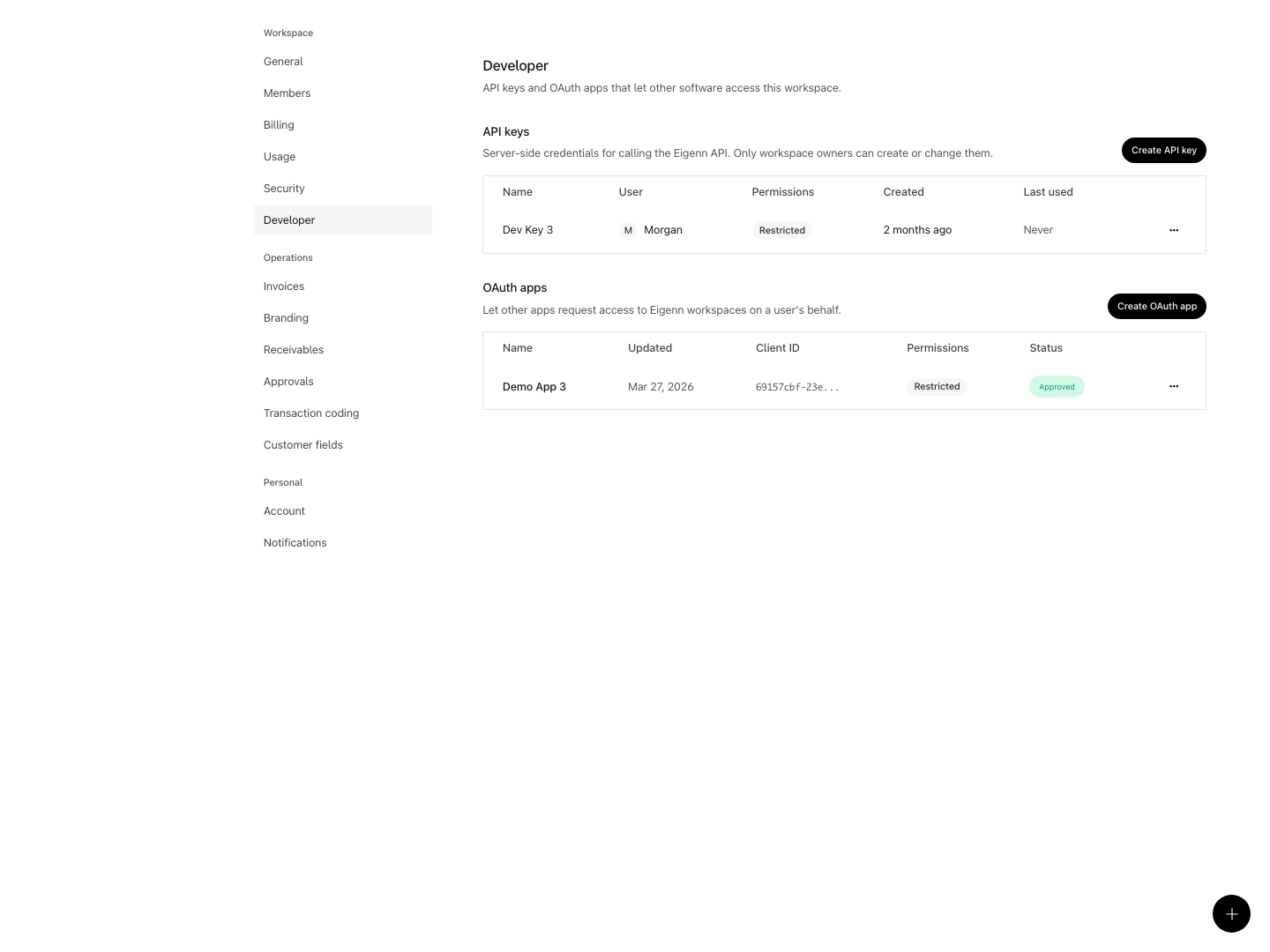
Shown with synthetic data in a local workspace.
Verification
- Open Settings → Developer and create a new API key; verify you can only view the secret immediately after creation.
- Use the API key to make a call to a readable resource at the documented endpoint and confirm the data matches expectations.
- Attempt to access a resource outside the granted scopes and confirm access is denied.
- Create an OAuth application, configure redirect URLs, and complete a consent flow; confirm access tokens are granted with the desired scopes.
- Revoke a synthetic user's app access and check that user's tokens across teams are denied. Confirm the test does not assume other users or service principals were revoked.
- Use the online API reference to verify endpoint availability, request/response shapes, and scope requirements.
- Install a generated SDK, perform an operation shown in the API contract, and validate the expected result.
- Replay an exact successful keyed write on an isolated fixture. Separately test an uncertain failure and confirm the client checks persistence before repeating the operation; successful-response replay is not an exactly-once guarantee.
Related
Related Pages
Customers
Use the customer ledger to check relationship health, invoice exposure, revenue concentration, and follow-up work.
Document Processing and Extraction
Understand how Vault files move from upload to searchable context, structured financial fields, human verification, and transaction suggestions.