Financial Overview
Understand the owner brief, priority queue, business pulse, and forecast entry points on Overview.
Summary
Overview is the owner-oriented finance page. It answers three questions:
- What needs attention first?
- What do current revenue, profit, cash, and runway say?
- Which decision must you check in Reports, Invoices, Receivables, or Forecast?
This page is also the finance command center view of the product.
Capabilities
The page surfaces prioritized finance action items, highlights weakest health signals, displays business pulse metrics with trend comparisons, and shares quick links to relevant working areas like invoices, cash settings, and forecasts. Users can filter the overview by different reporting periods. It gives projections but does not provide export, print, or live share functions.
Prerequisites
Prerequisites
The page is most useful after you do these tasks:
- Connect and turn on the bank accounts that must contribute to cash
- Sync or import the revenue and expense history
- Keep invoices, attempted payments, promises to pay, and customer payment methods current
- Create monthly budgets when plan-versus-actual alerts matter
The page needs signed-in workspace access. Owners, Members, and Viewers can read team finance queries. Viewers cannot do the team write operations that the page links to. These operations include forecast runs and budget changes.
Concepts
The overview relies on concepts of financial action triage, business health scoring, revenue and profit tracking, aggregated cash analysis, cash runway estimation using forecasts or recent history, and priority queues based on severity and business impact. Action items and summaries reflect linked business systems, and runway is only a modeled projection subject to actual variance.
Workflow
Choose the review period
Open Overview. Then use Reporting period:
- Last 4 weeks
- Last 3 months
- Last 6 months
- Last 12 months
- Month to date
- Year to date
- All time
- Custom range
For Custom range, enter From and To.
Eigenn stores the selection in the page URL. The report, health, action, and forecast queries then use that selection. Current cash balance is not a period sum. It comes from the connected accounts available now.
Owner brief
The Owner brief promotes the highest-priority action item. If the action list is empty, it points to the weakest health area.
The health line contains:
- an overall score out of 100
- the weakest of revenue growth, expense control, cash flow, and profitability
Use this to choose where to investigate. It is not a close status, an audit result, or a statement that every data source is current.
Do these first
This queue shows at most three rule-based items. Eigenn sorts the queue in this order:
- Critical before Warning before Info
- Larger monetary exposure first inside the same severity
Possible items and destinations:
| Signal | Destination |
|---|---|
| Overdue invoices | Invoices |
| Broken promises, failed payments, missing autopay, risky terms | Receivables |
| Category over budget | Reports |
| Bank connection error | Settings → Account → Bank Connections |
| Customer cards that expire soon | Customers |
Some severity rules are concrete by design:
- an invoice at least 30 days overdue is Critical
- three or more broken promises is Critical
- five or more failed payments is Critical
- bank connection errors and risky invoice terms are Critical
- an over-budget category has Warning severity
- a card that expires soon has Info severity
The queue can say Nothing urgent is blocking cash right now. That means that none of these buckets produced an item now. It is not proof that Eigenn reconciled the ledger.
Business pulse
Revenue
Revenue is the selected-period total. The line below compares it with the same dates one year earlier.
No figure for the same period last year means that Eigenn cannot calculate the comparison. Usually that earlier value is zero or absent.
Profit
Profit uses the selected reporting period and the same year-over-year comparison as revenue.
Cash
Cash is the total current balance across connected accounts in the resolved currency. The line below shows average monthly net burn or net inflow over the selected period.
If cash looks wrong, check the accounts that you turned on. Do this before you change the reporting period.
Runway
Runway is the number of months before cash reaches zero.
Eigenn resolves the figure in this order:
- The median (P50) runway from the canonical Monte Carlo forecast, when that forecast is available.
- The trailing burn-rate estimate, when the forecast is not available. This estimate divides current connected cash by average monthly net burn over the selected period.
When median cash does not reach zero inside the forecast horizon, Eigenn shows the horizon with a plus sign, such as 12+ mo. That label means no breach occurred inside the horizon. It does not mean that runway has no limit.
The page reads these bands:
| Display | Interpretation |
|---|---|
| Unknown | There is not enough connected cash and forecast context. |
| 3 mo or less | Cash is tight; test delays and expense reductions immediately. |
| More than 3 to 6 mo | Watch cash before you hire, spend, or extend terms. |
| More than 6 mo | The page describes runway as healthy. We recommend that you stress-test it before you make commitments. |
A period without net burn shows no runway countdown. Failed source reads show an unavailable state with Retry. These states do not establish an unlimited runway. Runway is a projection, not an observed balance or guarantee.
For the P10 and P90 outcomes and the probability of a cash-negative month, open Forecast. See Stress Tests.
Decision panels
Make more money
This panel uses the next-month revenue projection, or — when unavailable, and up to two collection-related actions. Work receivables opens the invoice working area.
Lose less money
This panel uses selected-period spending (revenue minus profit) and up to two bank or over-budget actions. Review spend opens Budgets.
Plan what may be coming
This panel uses projected revenue across the next six months. Run stress test opens Forecast with the combined severe-downside preset already represented in the URL.
The panel's projection is not a budget target. It is a modeled continuation adjusted by the active forecast logic.
Forecast before you commit
The final section shows:
- current unpaid-invoice count
- current unpaid-invoice value
- Test those payments arriving late
- Open forecast workbench
The first action opens Forecast with a collections-delay scenario. The second opens the baseline workbench.
For invoice-specific status, aging, payment, and collection analysis, use Invoices → Insights. The unpaid-invoice context on Overview is not a replacement for that dashboard.
Complete an overview review
- Set the correct reporting period.
- Read the owner brief and weakest health signal.
- Open all Critical items in Do these first.
- Reconcile Cash with the accounts that you turned on.
- Explain the direction of Revenue and Profit.
- Classify Runway with the page's 3- and 6-month thresholds.
- Open the most relevant decision panel.
- Use Forecast before you approve a future cash commitment.
The review is complete when every promoted issue has an owner or a resolution. The four pulse figures must be explainable. You must read the projected values as projections.
The page does not have a Save review or Mark complete action.
Behavior specification
Data Freshness
- The page queries current workspace records on load and when its URL-backed period changes.
- It shows placeholders while queries resolve and explicit unavailable states for failed reads. A missing health score shows not scored yet.
- It has no single last-updated timestamp for all sources.
- A bank-connection action means the connection needs attention.
- The absence of that action does not confirm the exact time of the last successful sync.
Check Settings → Account → Bank Connections for source health. Use Transactions to examine individual ledger entries.
Live page, export, and share boundaries
- Overview is a live signed-in workspace page.
- It has no CSV, Print, or page-level Share control.
- Reports gives CSV and Print for financial handoff.
- Public widgets are separate views with restrictions. They do not show the full Overview.
- Assistant shares are read-only snapshots of Assistant content, not live finance-overview access.
- Older finance analytics or bank-view links resolve to Reports rather than a separate Overview embed.
Diagrams
Rendering diagram…
Screenshots
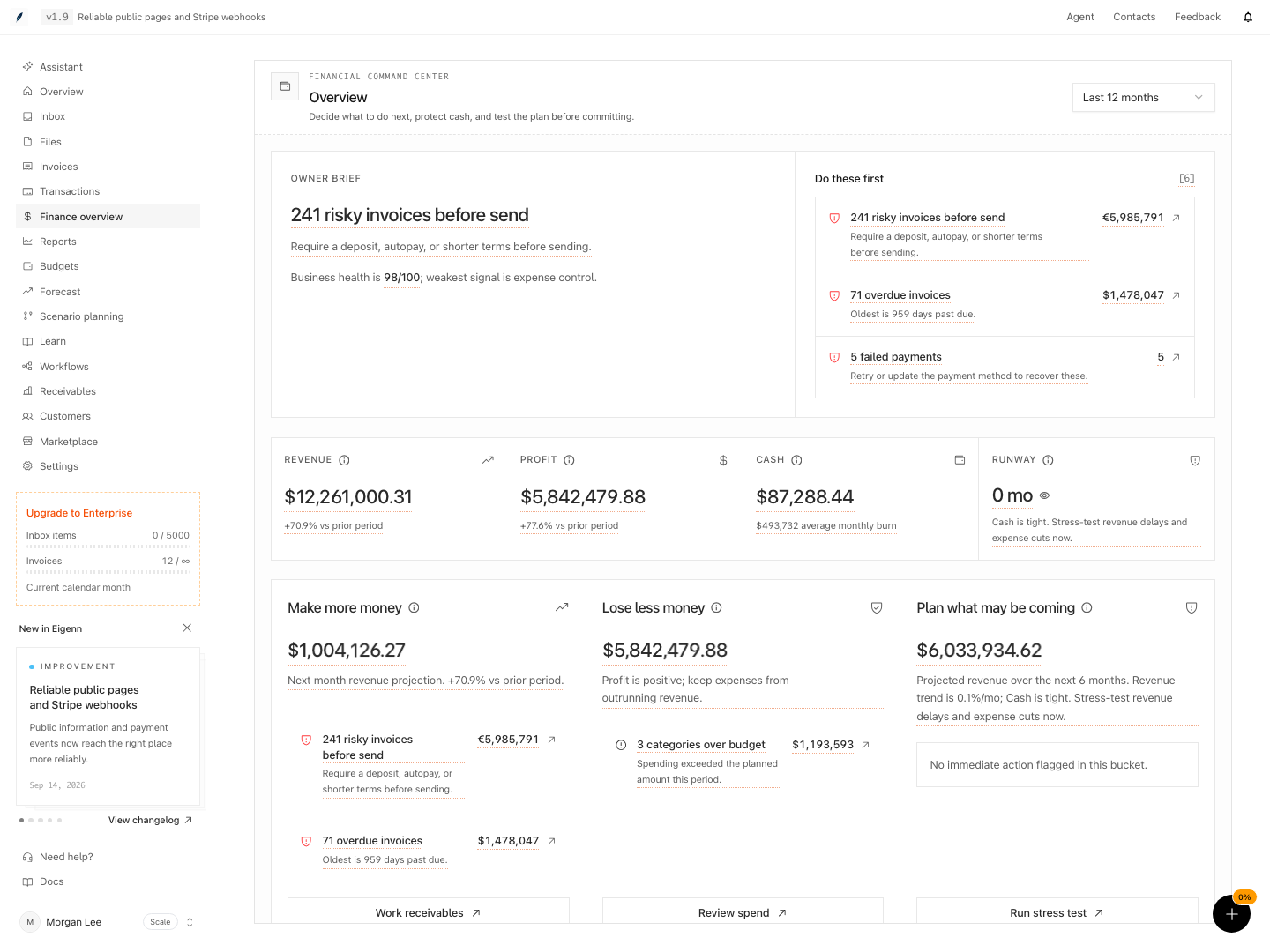
Shown with synthetic data in a local workspace.
Verification
Troubleshoot
Revenue or profit shows zero
Confirm that the reporting period contains recorded data. Then examine the transactions and the source connection. A current cash balance can exist even when the selected period has no revenue or profit.
Cash uses the wrong accounts
Open Settings → Account → Bank Connections. Then read which accounts you turned on.
An action opens a different product area
That is normal behavior. Overview is a triage page. The linked invoice, receivables, customer, report, or settings page contains the working detail.
The queue contains only three items
By design, the page limits Do these first to three items. Use the linked domain pages for full lists. Use the decision panels for two more category-specific actions.
Runway looks too optimistic
Open Forecast. Turn on Model real payment behavior when it applies. Then test the revenue, expense, and collections assumptions. Check P10 and cash-negative odds, not only the median.
- Change the reporting period and confirm that graphs and metrics update accordingly. Expected outcome: Business pulse and action items reflect the selected period.
- Inspect the owner brief and verify that it identifies either an action item or a weakest health area. Expected outcome: The owner brief highlights a top priority issue or weakest metric.
- Cross-check the number of visible Do these first items. Expected outcome: At most three items show, linked to their respective domains.
- Click an action item and confirm it routes to the relevant detailed area (such as Invoices or Settings). Expected outcome: The navigation opens the correct linked workspace view.
- Reconcile displayed cash balance with connected account balances. Expected outcome: Numbers align with up-to-date account data.
- Review the runway metric, then open Forecast for its underlying scenario and confirm median and horizon correspond. Expected outcome: Runway matches the reported median/horizon shown in Forecast.
- Try to export, print, or share the overview page. Expected outcome: No such controls are available for this page.
- Inspect bank connections and transaction freshness in Settings. Expected outcome: Current status of each account and sync is visible there, not from the overview alone.
Related
Related Pages
Financial Analytics and Reports
Review observed finance metrics, variance against the same period last year, projections, and export behavior under Reports.
Inbox and Approvals
Capture receipts and invoices, reconcile them with transactions, and review assistant-proposed actions from one shared workspace.