EIGENN.
docsguidesapichangelogpricingsign in
EIGENN.

Collaboration

Discuss a planning model in row comments, share focused saved views with teammates, and control access with team roles.

A planning model has one level of full access. A team Owner opens the full model, edits it, and manages who sees what. Other teammates work through a saved view that an Owner shares with them. A saved view shows only the rows, periods, and scenarios that its filters allow.

Comments keep the reason for a number inside the model. Each thread is attached to a row, or to one period of a row. A thread also belongs to the scenario that was active when you started it.

Use these pages to set up a review. First, make sure each person has the correct team role. Then share a focused view, and use comments to record questions and decisions.
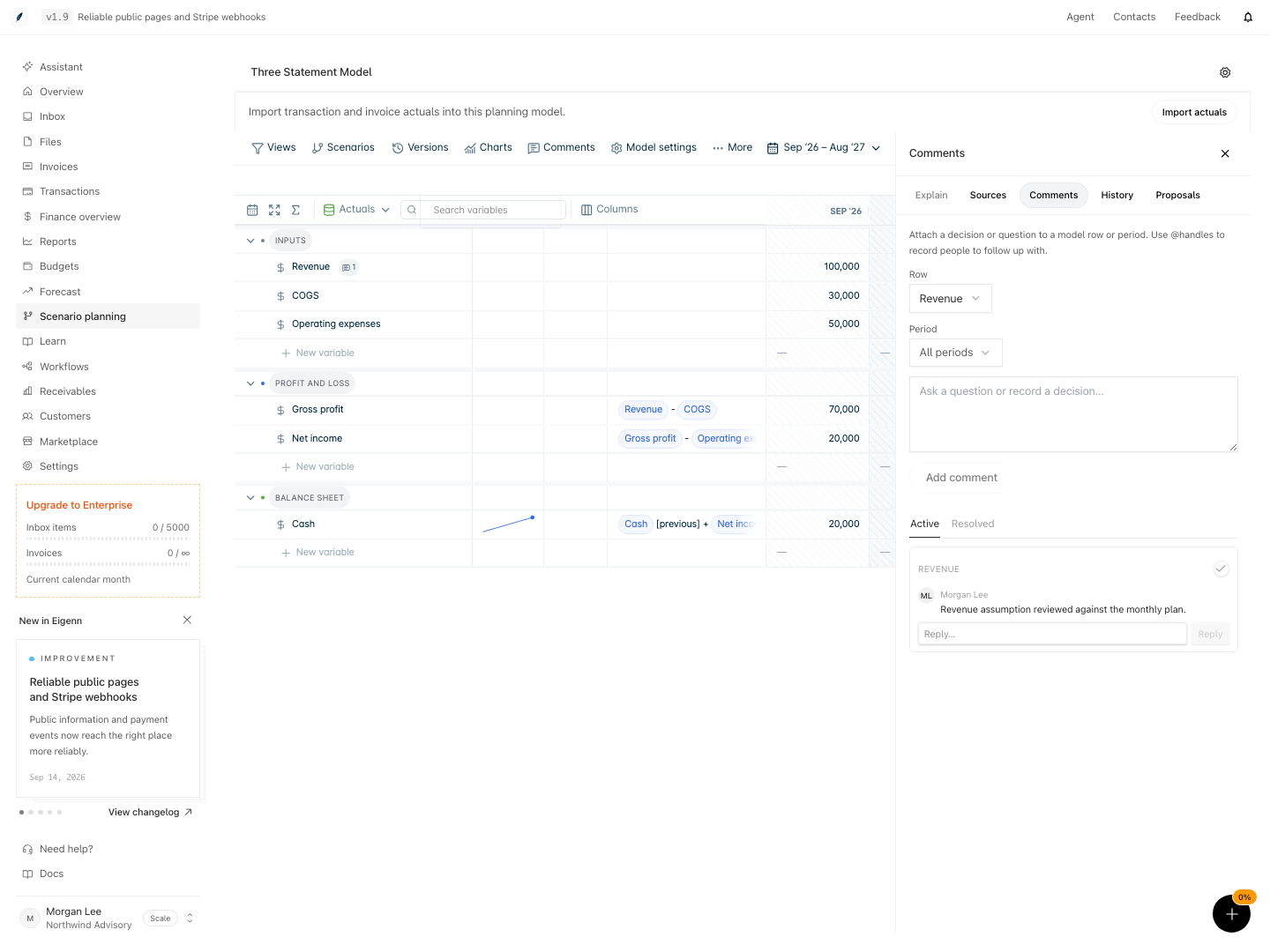
The Comments panel open beside a Three Statement Model grid. The Active tab shows a Revenue thread by Morgan Lee, and the Revenue row shows a comment badge.

Pages in this group

  • Comment on a model: add a comment to a row or period, reply, mention a teammate, and resolve the thread.
  • Share a model and set access: share a saved view with a teammate as Can view or Can edit within view, and copy the link.
  • Team roles and planning access: learn what an Owner, a Member, and a Viewer can do, and which plans include planning.

Other review tools

  • To suggest a set of scenario changes without applying them, select More → Propose changes. The collaboration guide shows the full proposal review.
  • To keep a decision point, save a named version before the review starts. Refer to Versions.

Related

  • Views
  • Versions
  • Collaborate on a planning model
  • Teams and organizations

Choose cash or accrual for Xero

Set the accounting method that a Xero statement source uses for the profit and loss.

Comment on a model

Attach a question or decision to a row or period, reply in the thread, mention a teammate, and resolve the thread.

On this page

Pages in this groupOther review toolsRelated

Eigenn docs

current product

Overview
Overview
OverviewAccount PreferencesApproval PoliciesAssistant AutomationAssistant Command CenterAssistant Workspace and Saved WorkBank ConnectionsBilling and UsageBudgets and ForecastCommand CenterCustomer FieldsCustomer LifecycleCustomer RecordsCustomersDeveloper PlatformDocument Processing and ExtractionFiles and Document VaultFinancial Analytics and ReportsFinancial OverviewInbox and ApprovalsInvoice InsightsInvoice ProductsInvoicesMarketplace IntegrationsNotifications and BrandingOnboarding and SupportOverviewPlanning Data and DimensionsPlanning Models and FormulasPlanning Time and ActualsPlanning UncertaintyPlanning Versions and CollaborationPlanning Views and ExportsPlans and AdjustmentsReceivablesReceivables AnalyticsReceivables ControlsRolling Budget CloseScenario PlanningSecurity and AccessSettings OverviewStress TestsTeams and OrganizationsTone Profiles and ExperimentsTransaction Categories and RulesTransaction CodingTransactionsWeekly Finance RitualWorkflow ExecutionsWorkflow OutcomesWorkflow PausesWorkflows
OverviewBudget vs. ActualsBuild a Driver-Based Planning ModelBuild and Review a ForecastBuild Your First WorkflowCollaborate on a Planning ModelCompare and Share Planning ScenariosConfigure Approval PoliciesConfigure Assistant OperationsConfigure Customer FieldsConfigure Notifications and BrandingConfigure Planning Time and ActualsConfigure Receivables ControlsConnect Planning Data and ActualsConnect Transaction RecordsConsolidationCreate and Manage CustomersCreate and Send InvoicesCreate Your First Planning ModelDeveloper API SetupFirst Cash ReviewHeadcount PlanningInvoice Collection WorkflowMaintain Transaction RulesManage Security and BillingManage Team AccessManage the Invoice LifecycleMCP WorkflowsMonitor and Recover WorkflowsOrganize and Share DocumentsProcess Inbox ItemsReconcile and Categorize TransactionsRevenue ForecastingReview a Customer Finance RecordReview, Restore, and Export a Planning ModelRun a Finance Operating ReviewRun a Receivables Tone ExperimentRun a Runway Stress TestRun Planning Uncertainty AnalysisRun Your First Command Center ReviewSave and Share Assistant WorkSet Up a WorkspaceTroubleshoot Account AccessWebhook DeliveryWeekly CFO Review
Overview

Concepts

DataDimensionsFormulasScenarios

Variables

VariablesChange an input over timeCreate a variableFormat a variableOrganize variablesTime totalsUse a variable from another modelVariable types

Time

TimeLast actual dateRoll the model forwardTime granularityTime settings

Formulas

FormulasBlanks and helpersCommon formulas: cash and balance sheetCommon formulas: cohortsCommon formulas: currency and multiple entitiesCommon formulas: headcount and payrollCommon formulas: SaaS metricsCommon formulas: seasonalityConditionalsDimension referencesFormula syntaxFunctionsTime referencesTroubleshoot formulasValues with uncertaintyWrite a formula

Charts and Dashboards

Charts and dashboardsCompare scenarios and versionsCreate a chartExport and shareTablesTime aggregation in charts

Dimensions

DimensionsApply a dimensionCreate a dimensionDimension examplesDimension totalsThe Dimensions page

Data

DataChoose cash or accrual for XeroConnect a data sourceLink a variable to dataRefresh and check actualsUse transaction categories as actuals

Data Integrations

Data integrationsBank transactionsCSV importFortnoxQuickBooksStripeXero

Views

ViewsCreate and edit a viewFilter a viewShare a view

Versions

VersionsCompare versionsRestore a versionSave a version

Scenarios

ScenariosCompare scenariosCreate a scenarioPlans and adjustmentsStress tests and shocks

Collaboration

CollaborationComment on a modelShare a model and set accessTeam roles and planning access

Managing Models

Managing modelsDuplicate a modelExport a modelModel limits and performanceStart from a templateThe models home and foldersTrash, restore, and delete a model
OverviewIntegrationsMCPSDKsWebhooks
OverviewAuthenticationBank Accounts APICustomers APIErrorsForecasts and Stress Tests APIInvoice Payments APIInvoices APIPaginationRate LimitsRemote Tracker API StatusTracker Categories APITracker Entries and Timers APITracker Projects APITransactions APIWebhooks API StatusWorkflows API
Overview
Overview